
AI Photo Scan
Open the live camera or pick from your gallery, snap your plate, and AI vision detects each food with calories and macros. Every item is editable — adjust the quantity and the numbers re-scale live.
AI Calorie & Macro Tracker
Calivora AI turns your camera into a nutrition coach — snap any meal and instantly know its calories and macros, with a plan built around your goal. Prefer not to photograph it? Log by barcode, by voice, or in two taps.
Free plan available Any language Photos never stored
 AI analysing meal…
What it is
Calivora AI is an AI-powered calorie, macro and habit tracker for Android. You photograph a meal and AI vision returns its calories, protein, carbs and fat. Every detected item is editable, so the numbers are yours, not the model's.
Beyond the camera it does the rest of the job too: barcode scanning against a public product database, voice logging, AI workout analysis, water and weight tracking, streaks, progress charts, and a built-in AI nutrition coach that already knows your goal. The entire interface can run in any language, and the app re-themes itself around whichever goal you pick.
| App | Calivora AI |
|---|---|
| Category | Health & Fitness |
| Platform | Android, via Google Play |
| Package | com.calivora.ai |
| Price | Free plan with ads · optional Premium |
| Free trial | 7 days on Premium |
| Minimum age | 18+ |
| Languages | Any — AI translated, RTL supported |
| Internet | Required |
| Support | aicalivora@gmail.com |
Features
Four ways to log a meal, a coach that knows your numbers, and the tracking that turns a week of meals into a decision.
Open the live camera or pick from your gallery, snap your plate, and AI vision detects each food with calories and macros. Every item is editable — adjust the quantity and the numbers re-scale live.
Live camera scanner or manual entry, with real product nutrition pulled from the free, public Open Food Facts database. Only the barcode number ever leaves your device.
Tap the mic, say what you ate in any language, tap stop. Speech-to-text transcribes it and the AI parses the foods — and every detected item is editable, just like a photo scan.
Already know the numbers? Name plus calories, with optional macros, logged in seconds. No camera, no connection to a database, no friction.
A full-screen AI nutrition coach on a draggable button. Pick your topic, and it tailors every reply to your goal, weight and targets. Chats are saved so you can reopen any conversation, and it replies in your language.
Describe a workout in any language, add the minutes, and the AI returns a MET-based calorie burn that feeds straight into the Maintain Weight energy balance.
A goal-aware daily engine tracks calories, protein, carbs, fat and water, and rolls unmet calories and protein over at midnight so one bad day doesn't derail the week.
Weight tracking with pace projection, calories by meal, daily and weekly charts, meal history, plus streaks and achievements to keep the habit alive once motivation fades.
Pick any language and the whole app translates, right-to-left scripts included. Your choice is bound to your account and follows you across devices — and the coach replies in whatever language you write in.
Meal, water, calorie-check, streak and weigh-in reminders, achievement alerts, and a personalised midnight summary of your day — each with its own toggle, so you keep only what you want.
Continue with Google, or use email and a password. Sessions persist until you sign out, passwords are stored only as salted hashes, and every account can only ever read its own data.
A true dark theme that persists across restarts, and a clear full-screen overlay when you lose connection that disappears the moment you're back online — no silent failures.
How it works
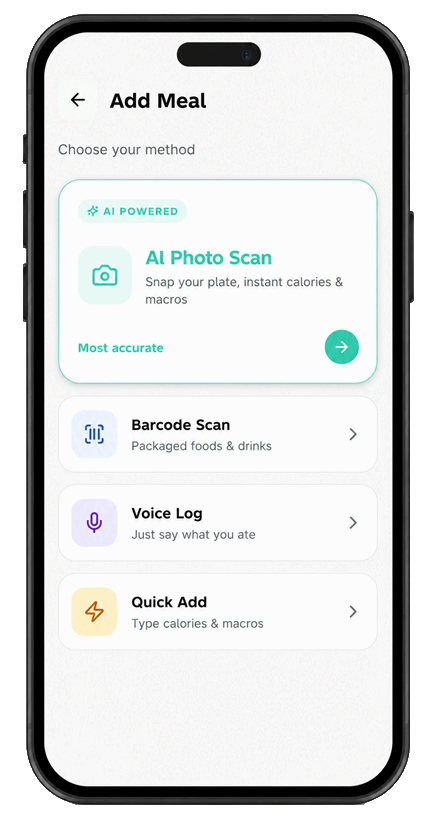
Take a photo of your plate — or log by voice, barcode, or Quick Add. Four routes to the same place, so there's always one that fits the moment.
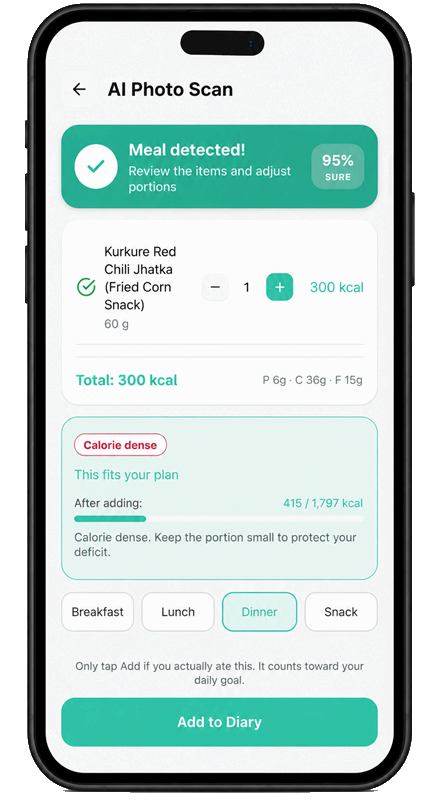
Calivora estimates calories, protein, carbs and fat, and shows how confident it is. Every item is editable — change a portion and the numbers re-scale before anything is saved.
A personalised daily plan for Lose Weight, Maintain Weight or Build Muscle adapts as your weight changes — and tells you whether what you just scanned still fits today.
Your goal isn't just a setting — the whole app re-themes around it, and the daily engine works differently for each one.
A calorie deficit with protein kept high. Unmet calories and protein roll over at midnight so a low day is accounted for, not forgotten.
A true energy balance: AI-analysed exercise burn is folded in alongside your intake, so training days aren't penalised.
A controlled surplus with a protein floor, and the same midnight roll-over so a missed protein target carries into tomorrow.
Inside the app
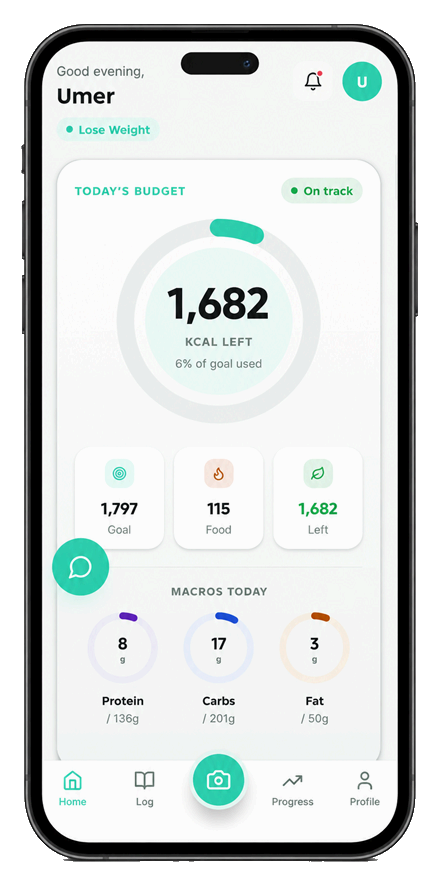
Real screenshots from the Android app — swipe through the whole flow, from your daily budget to the AI coach.
Snap your meal — AI does the counting
Calories left, macros and an on-track signal the moment you open the app.
Four ways to log
Photo, barcode, voice or manual — whichever is fastest right now.
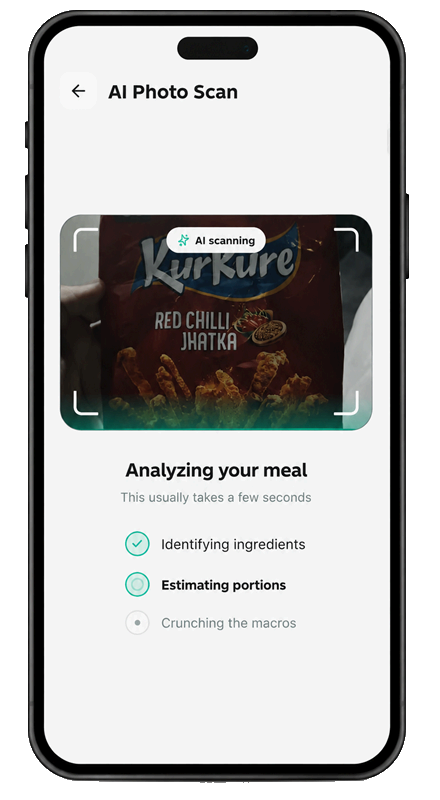
Calories & macros in seconds
Watch it identify ingredients and estimate portions live.
Every item is editable
A confidence score, adjustable portions, and whether it fits your plan.
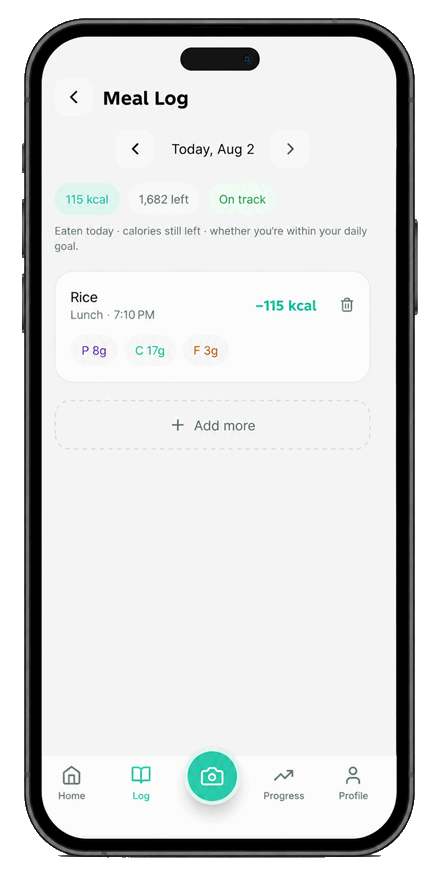
Your meal log
Every meal for the day, with its macros and what you have left.
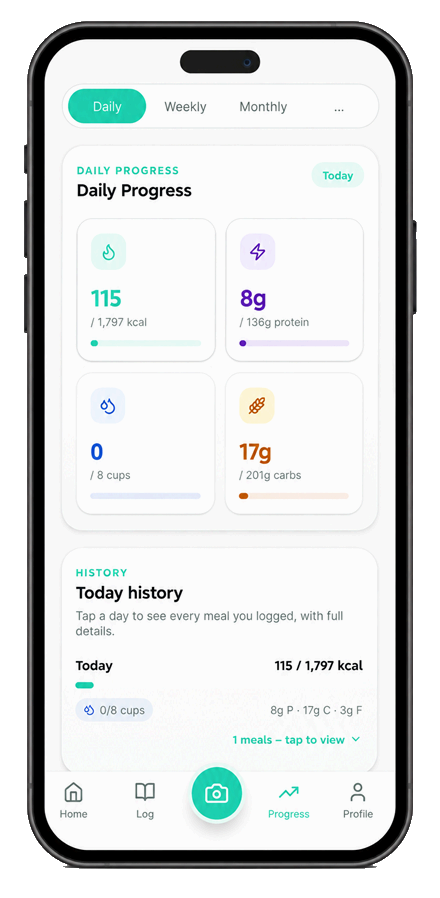
Track weight, water & progress
Calories, protein, carbs and water, each against your target.
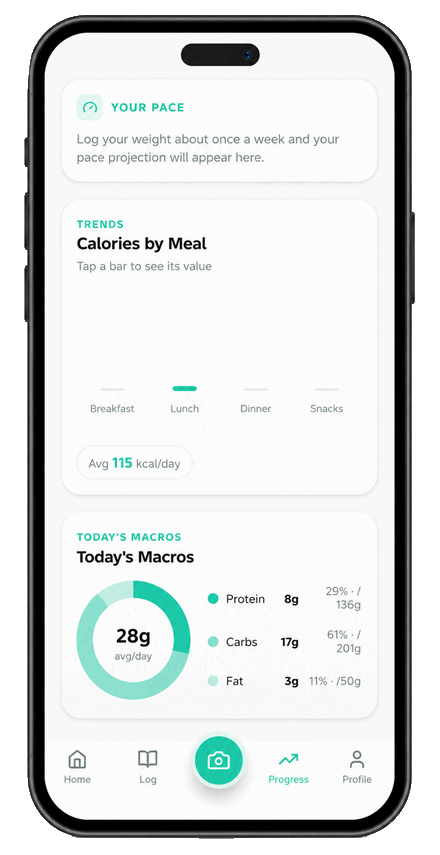
A plan built around your goal
Pace projection, calories by meal and your macro split.
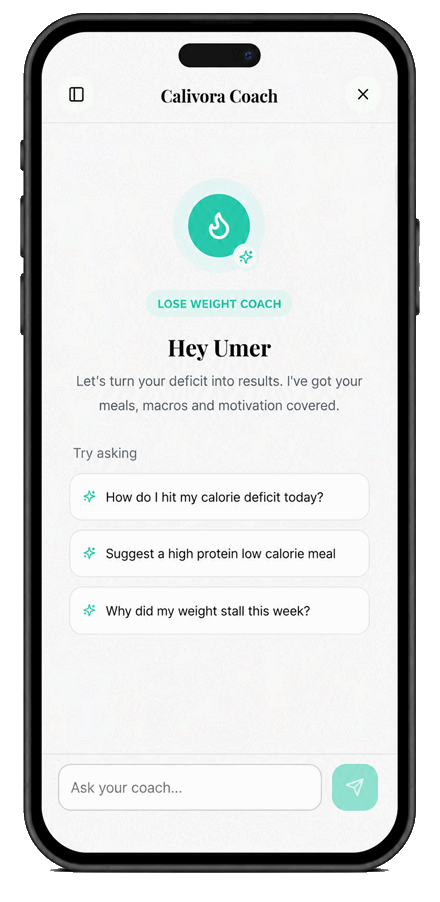
Your AI nutrition coach, 24/7
Goal-aware answers about meals, macros and plateaus.
Swipe or scroll to see all eight screens
Plans
The core tracker is free. Premium removes ads and unlocks the AI features in full, with a 7-day free trial.
| Feature | Free | Premium |
|---|---|---|
| Manual logging & barcode scan | Included | Included |
| Calories, macros, water, weight, progress, streaks | Included | Included |
| AI Photo Scan, Voice Log, Calivora Coach | Limited | Full access |
| Ads (Google AdMob) | Shown | Removed |
| Billing | — | Monthly or yearly · 7-day free trial · cancel anytime in Google Play |
Pricing is set by Google Play. The current price in your local currency is shown inside the app and on the Google Play listing. Subscriptions are billed by Google, renew automatically, and can be cancelled at any time.
Privacy first
What you eat is personal. Calivora AI collects only what the app needs, and the single most important thing to know is what happens to your photos.
FAQ
The product, the permissions, the AI and the privacy — answered plainly.
Calivora AI is an AI-powered calorie, macro and habit tracker for Android. You photograph a meal and AI vision returns its calories, protein, carbs and fat. You can also log by barcode or voice, analyse workouts, track water and weight, and chat with a built-in AI nutrition coach. The whole app runs in any language and re-themes around your goal: Lose Weight, Maintain Weight or Build Muscle.
You open the live camera or pick a photo from your gallery. The image is sent over an encrypted connection to our Supabase Edge Function, which forwards it to an AI vision provider. The AI detects each food and returns calories plus protein, carbs and fat. Every detected item is editable — adjust the quantity and the calories and macros re-scale live before you save.
AI vision gives an informed estimate, not a laboratory measurement. Accuracy is strongest on clearly visible, well-lit meals. Hidden oils, sauces and heavily mixed dishes are genuinely hard to judge from a photo — which is exactly why every detected item stays editable, and why packaged foods are better logged by barcode, which uses real product nutrition data.
No — an internet connection is required. AI photo scan, voice logging, barcode lookup and the AI coach all run in the cloud. If you go offline, a full-screen overlay blocks the app and automatically disappears the moment your connection returns, so you're never left wondering whether something saved.
No. Your food photos are processed, not stored. A photo is sent to the AI provider only to generate your result and is then discarded. It is not saved into your history, not retained by us, and never used to train AI models. Only the resulting nutrition data is saved, after you confirm it. See Privacy Policy §7.
Yes. Data is encrypted in transit with TLS and at rest. Postgres row-level security means an account can only ever read and write its own rows. Passwords are stored only as salted hashes. All AI provider keys live server-side in Edge Functions and are never shipped inside the app. Subscription entitlement is verified server-side, so the client cannot grant itself a paid tier.
Yes. Your health, food, body and AI-chat data are never sold and never shared with AdMob, advertisers or any ad network, and they are never used to target advertising. Advertising on the free plan uses only the device advertising identifier that Google collects — never your nutrition or body data.
Camera for AI Photo Scan and barcode scanning · photos and media for choosing an existing image or an avatar · microphone for Voice Log · notifications for reminders. All four are optional and can be revoked in Android Settings — only the matching feature stops working. Internet access is required for the app to function. Full detail in Privacy Policy §6.
The camera powers AI Photo Scan and the live barcode scanner. It is activated only on those screens, only while you are actively scanning, and never in the background. Deny it and you can still enter barcodes manually, use Voice Log, or use Quick Add.
Solely for Voice Log, so you can say what you ate instead of photographing or typing it. The microphone is active only between your tap to start recording and your tap to stop. It is never used in the background, never while the app is closed, and never to listen passively. Your voice is never used for identification, biometrics or advertising.
You tap the microphone, describe your meal out loud in any language, and tap
stop. The recording goes over an encrypted connection to our
voice-log Edge Function, where OpenAI Whisper
transcribes it into text. The AI then parses that text into individual foods
with calories and macros, and every detected item is editable before you
save. The recording is not retained after transcription.
Yes, in three other ways. Barcode Scan reads packaged products using the free public Open Food Facts database, and you can type a barcode manually if the camera can't see it. Voice Log lets you speak your meal. Quick Add takes a name plus calories, with optional macros, in seconds.
A multi-provider backend with automatic failover. Anthropic Claude Haiku 4.5 is the primary provider, including vision. OpenRouter is a fallback route to Anthropic models. OpenAI gpt-4o and gpt-4o-mini are the final fallback, and OpenAI Whisper handles all speech-to-text. Every call goes through our own Supabase Edge Functions, so provider keys stay server-side and the app never contacts a provider directly.
An AI nutrition chatbot built into the app. It opens from a draggable floating button on Home, and you pick a topic — Lose Weight, Maintain Weight or Build Muscle. It knows your name, weight, goal and targets, remembers recent messages in the open conversation, saves every chat so you can reopen it later, and replies in the language you write in. It's scoped to nutrition, training, your goal and app usage; off-topic messages are politely declined.
Yes. The entire app can run in any language, using AI translation cached in Supabase and on your device. Right-to-left scripts are supported. Your language choice is bound to your account and follows you across devices, and the AI coach replies in whatever language you write in.
Yes — there's a free plan, supported by ads. An optional ad-free Premium subscription unlocks the AI features in full, with monthly and yearly plans and a 7-day free trial. The current price in your local currency is shown in the app and on Google Play.
Premium is sold through Google Play Billing and renews automatically until you cancel. Yes, you can cancel anytime — in Play Store → Profile → Payments & subscriptions, or via Manage Subscription in the app. You keep Premium until the end of the period you already paid for. Purchases are verified server-side before any paid feature unlocks.
The free plan shows Google AdMob banner ads on the Log and Progress tabs, plus an occasional frequency-capped interstitial after a capture completes. Premium subscribers never see ads. In the EEA and UK a Google-certified consent form appears before any personalised advertising, and non-personalised ads are requested unless you consent.
In the app: Profile → Data Consent → Delete account. Your account enters a 7-day grace period — sign in again within those 7 days and the deletion is cancelled and everything is restored. After 7 days it is permanent. Can't open the app? Email aicalivora@gmail.com with the subject "Delete my account". Full detail on our Account Deletion page.
No. Calivora AI provides general wellness information only. It is not a medical device and does not provide medical advice, diagnosis or treatment. Consult a qualified healthcare professional before changing your diet or calorie intake — especially if you have a medical condition, are pregnant or nursing, or have a history of disordered eating.
Calivora AI is for adults aged 18 and over. It is available
on Android through Google Play; the package name is
com.calivora.ai.
Email aicalivora@gmail.com. The same address handles support, bug reports, feature requests, privacy questions, account deletion and business enquiries. Support requests are typically answered within 2 business days. See our Contact page for what to include.
Get started
Calivora AI is free to download on Android. Snap your first plate and see the full breakdown in seconds.
Free plan with ads 7-day Premium trial Cancel anytime in Google Play Adults 18+